Thursday, October 21, 2021

Troubleshooting Guide for Educators

Technology is not always perfect or easy to work with. However, by having a step-by-step guide, it will help you better understand your computer and become your own mini IT Department. I have five problems and solutions that I have faced over my career as a teacher. These are not all of my problems and solutions that I have faced, but I have encountered them multiple times over the last three years. 

Image Source: https://www.indiatoday.in/education-today/jobs-and-careers/story/10-uses-of-technology-in-21st-century-jobs-1358394-2018-10-08

PROBLEM: There is network connectivity, but students' Chromebooks will not print.

SOLUTION: You will need to check if your Chromebook is connected to the printer correctly.

1. Select Time

2. Select Settings

3. Select Advanced

4. Select Printers under "Print and Scan" 

5. By Available printers to save, select Save

Also make sure both the printer and Chromebook are on the same network. 


PROBLEM: Printer prints out blank pages, but will not print pages with text.

SOLUTION: Make sure your printer is working at top speed!

1. Restart your computer

2. Resolve Ink or Cartridges Problems

3. Unclog the Print Head Automatically

4. Unclog the Print Head Manually


PROBLEM: A teacher calls you and says that the projector will not project from his laptop computer.

SOLUTION:

1.Press the A/V Mute button on the remote control to see if the image was temporarily turned off.

2. Make sure all necessary cables are securely connected and the power is on for the projector and connected video sources.

3. Check the settings on the Signal menu to make sure they are correct for the current video source.

4. Check the Display setting to make sure the brightness is turned up.If the projector does not respond when you press buttons on the remote control, make sure the remote receivers are turned on.

5. For images projected with Windows Media Center, reduce the screen size from full screen mode. 

6. If the other solutions do not solve the problem, reset all of the projector settings using the options on the Reset menu.

7. The projector may not be able to project copyrighted videos that you play back on a computer. For details, see the manual supplied with your computer.


PROBLEM: I can get the network in a room at one end of the hallway, but when I move to a room at the other end of the hallway, I lose the connection

SOLUTION: 

1. Reposition the router for a connection. 

2. Determine if there are many obstructions that could interfere with the connection.

3. Set up a Wireless Repeater. 

By making sure that the router is set-up, it is important to determine if you will need a different router system or placement depending on the building.  


PROBLEM: I just installed a Windows 10 update on my machine and it keeps freezing up.

SOLUTION:

1. Update your computer

2. Clear out unused files

3. Run a memory check

4. Run a disk check

5. Run a System File Check


I hope this guide helps you fix or update your current devices. When you update your systems and devices, you will give them a longer life to run more smoothly and efficiently. 

Monday, June 28, 2021

Reflective Post #2 EDU 780

Reflective Post #2
By: Deanna Mulay

Image Source: https://www.globalfocusmagazine.com/tag/technology/ 
1. Now that you have finished the course, what is your stance on your role as an educator of Digital and Media Literacy? Has this changed from the beginning of the course?

    Now that I have completed the course, I have learned what digital and media literacy is and why it is important to have in our classrooms. At first, I thought that digital and media literacy was just having students use tools, such as social media or use different sites to research topics. Now that I have learned more about digital and media literacy, I know that it is a way for students to use critical thinking skills, be more engaged in lessons, and allow all students to participate. Digital and media literacy is also a great way for enhancing lessons. Technology is not suppose to replace lessons, only enhance them. In terms of my role as an educator of Digital and Media Literacy, I take more of a stand on different technology platforms for students to use and for me to advocate to enhance lessons for every classroom by  using technology. Technology may seem like a distraction, but educators need to find ways of using the tools to make more lessons engaging for all students. 

2. How can you continue growing as an educator of Digital and Media Literacy?

    I can continue growing as an educator of Digital and Media Literacy by taking risks with technology tools and continue looking into different tools to add in my technology toolbox. I can also create and attend different professional developments to help discover new tools to use for teachers and students as well. During this course, we were asked to find a new tool and also create a professional development. By repeating those assignments, I will be able to continue to grow and develop my skills as an educator of Digital and Media Literacy.  

3. Overall, what will you take away from this course?

    I will take away many ideas from this course. However, the one point that sticks with me is that technology is NOT meant to replace lessons. I think many educators, including myself, thought adding a technology tool at the end of the lesson was a way to incorporate more technology. In reality, technology should be included in every part of a project that students are working on. This course has given me a different take on technology and how I view it in the classroom. It is NOT a distraction or add-on to a lesson, rather an enhancement to the lessons to support all students. 

4. Any other feedback regarding this course (suggestions, questions, feedback etc.)

    I really enjoyed taking this course because I learned so much. I really enjoyed the Cool Tools Show-and-Tell. I think it was a great activity to learn more about different tools. It was also great to read about other educators' tools that they chose. I would like to do a similar activity in the future. I have really enjoyed this course and have learned so much!

Image Source: https://www.chieflearningofficer.com/2021/03/15/reflection-in-action-a-case-for-case-studies-amid-covid-19/


Tuesday, March 2, 2021

Implementation Reflection

    I really enjoyed being a part of an implementation plan at my school. We did not use any technology for science or social studies, plus the students were not engaged in the lessons. I really enjoyed learning about two technology platforms that I did not even know existed until this project, Makers Empire and Tinybop Schools. I thought the most positive aspect of this plan was learning the new platforms and seeing how the students went from zero engagement to complete engagement with science and social studies. I am very proud of our team because all of us, classroom teacher and three instructional aides, went out of our comfort zones to try something new with our students. We were able to collaborate and communicate more than we ever have this year. The students really enjoyed Makers Empire because they were able to create their own animal with the guidelines that we provided them with. The challenge that we did face was when we tried to have our students try Tinybop Schools independently. The students were becoming frustrated and we could see their engagement drop. However, we quickly thought about a whole group lesson, which really pulled the students back into our lesson. When we did Tinybop Schools as a whole group, the students were able to verbalize their thinking while using this platform. Overall, I really did not think we had too many challenges besides switching our one platform to a whole group lesson rather than independent work. 

    I love that I was able to learn more about my topic of incorporating more technology into our classroom. I believe that it is so important to have the technology because it allows students to have real-world experiences. I believe that if we choose to include/look into new platforms, we can use the same approach to implement different platforms with our students. 

Image Source: https://www.indiatoday.in/education-today/jobs-and-careers/story/10-uses-of-technology-in-21st-century-jobs-1358394-2018-10-08

    As a future Technology Leader/Change Agent, I realized that there is tons of planning that goes into an implementation plan. This was a simple new technology addition to our classroom, but it made me realize that we had to learn about these platforms, make sure they were going to support our students in more ways than one, if we needed to pay for them, etc. This project has given me a bigger appreciation for the role of Technology Leader/Change Agent. 


    One of the next steps that I need to take for my journey in the Technology Specialist Program is to complete two more courses with confidence and pride when I think about my dream job. I want to make sure I am continuing to pursue my passion of teaching students about technology and the importance of how teachers can utilize technology in their classrooms. One of the steps that I am nervous about is to take the Technology Content Exam. That being said, I know that if I focus on my passion for my dream career, I know that I will pass my exam!

Image Source: https://www.teachingquality.org/learning-to-lead-together-harnessing-your-change-agent-superpower/


Monday, February 8, 2021

It's a Start!

As a technology leader, there are a lot of little details to be aware of when implementing new tools in a classroom. I quickly realized that you have to think of the platforms, how much they will cost, are there any legal situations involved, etc. This role has made me think more about the role of a technology leader, rather than someone who just creates lessons and collaborates with other teachers. The aspect of being a technology leader that I perceive to be most challenging is to make sure that I am confident enough to say to coworkers and administrators what our students need and how we can provide those resources to our students. I am a very shy person and I often “hide behind the screen” with emails. I need to work on more face-to-face interactions. I feel that I have many great ideas, but I need to practice more how to tell others what I am thinking and how the resources I find can help support our students. 

Image Source: https://medium.com/thrive-global/why-you-should-harness-the-power-of-reflection-4a8f6d7710d4

During these first four weeks of this course, I had realized that there are a lot of little things that go into becoming a technology specialist. For one, time frame. I really thought this implementation was going to take longer than it has. I was thinking about two weeks of practice for teachers and then using it with the students. But we had our meeting with the Library Director and we practiced for one day on both platforms and felt confident using them with the students. We are going to introduce the Tinybop Schools to the students this Friday (February 12th) for our social studies lesson. Friday we will be collecting our data to see if this implementation is a good fit for our class. Next week, Wednesday, we are going to use Makers Empire for science. I have really enjoyed learning about our new tools to use with the students. I think that the students will be more engaged in our lessons, rather than the teacher talking all the time. I think that this project has made me realize all of the steps that go into a technology leader and how I can implement new tools for students. 


Image Source: https://mattharrisedd.com/2015/06/28/educational-technology-leadership-2/


Tuesday, December 15, 2020

Professional Development Reflection

I have been working on a project for the past eight weeks about developing professional development for our teachers. The professional development is for tools that are rarely used on SeeSaw and Google Classroom. I have been very excited for our professional development to take off because my passion is to help teachers with technology. Oftentimes I see educators either hardly using technology or using the same tools over and over again. During this school year, I have seen a great decline of student engagement, but my hope is that teachers will be able to learn a new tool on platforms they are already familiar with. 

Image Source: https://www.gpb.org/blogs/education-matters/2015/07/15/top-10-edtech-tips-seesaw

Overall, this process has been very smooth. I think that the teachers have been looking for new ideas to use technology and this is a way that we can all get together and have a discussion rather than having one person talk for the entire meeting. My favorite part about my professional development is that I built in a two week trial for the teachers to try out SeeSaw and then another two weeks for Google Classroom after our initial meetings. I believe that having time for teachers to try out the tools on the platforms will make the process a lot easier for them to use the tools with their students on a regular basis. 


Image Source: http://blog.ncce.org/2019/09/19/google-classroom-users-have-you-seen-the-new-originality-reports/


One challenge that came up was that a few of the teachers’ access codes were not working correctly. We were able to correct the problem by communicating with IT to replace the access codes with new ones. After checking that everyone had the access codes, it was pretty smooth sailing for both SeeSaw and Google Classroom. 


I think this project has helped me come out of my shell and force me to work with other teachers that are not part of my grade level or teachers who teach specials. This has made me realize how many ideas for the use of technology are actually in the next room over or down the hall. Instead of looking on the internet for ideas, we can help and support each other as a team. My passion for becoming a Learning Resource Center Director has blossomed during this experience. At first, I was doubting if this project would ever take flight, but it has actually been one of the highlights of the year for my educational career. The more I put into this project, the more excited colleagues got to learn new tools/ideas to use with SeeSaw and Google Classroom. I think that the positions for Learning Specialists and Instructional Designers have great opportunities to help other educators create a strong learning environment for all students. There are ups and downs for any job, but at the end of the day, we can make a difference in our students’ lives.

Image Source: https://www.wordwritepr.com/blog-2/stressing-the-importance-of-professional-development-within-your-organization


Sunday, November 22, 2020

Reflection of the Professional Development Project

  I have been working on a project for a few weeks now, and it is time to reflect on the progress that I have made so far. My project is to have more professional development for teachers using SeeSaw and Google Classroom. Both of the platforms are currently being used by teachers, however, we continually fall into the routine of doing the same activity, but different topics. The goal is to have teachers learn more about the different features on SeeSaw and Google Classroom. So far the process has been really great. I believe that this project has strengthened the collaboration process between the classroom teachers and the library staff. For example, the Learning Resource Center (LRC) Director and I have been working together on learning new features, such as using the links to incorporate into a lesson. We discussed that we can link a different website to SeeSaw, but then the students can do an activity in SeeSaw. Students would be able to explore new websites, but they would also be able to write/draw about what they learned from that site. 

Even though this project has gone pretty well, we wanted to include more technology platforms, but it was too much to explore at once. We are trying to mainly focus on SeeSaw and Google Classroom, but we have only really talked about SeeSaw. We are struggling to find the time to discuss Google Classroom, but I think we need to first finish SeeSaw and then start a new plan for Google Classroom. I think that these are only a few minor problems, but I am sure we will be able to make accommodations. I am very excited about our professional development because it will not only benefit our teachers, but also our students. I think that this professional development is also going to strengthen the bond between the staff, while also learning new information about the platforms we already use so much. 


During this planning process, I have seen the bond between myself and the LRCD when we discuss what the teachers need to learn. We are also looking into different sites, such as Kodable, for our Kindergarteners to use and then have them create their own map on SeeSaw. I believe that I have even seen a more positive aspect with my relationship with technology. I would always try to avoid the tools because I never knew how to use it or just never had time to devote to the tools. Just from planning out the professional development has helped me in my classroom use more technology and realize that it is fine to not know how to fully use the tool. With time and practice, teachers will become more fluent with the use of the technology tools.


In terms of the Technology Specialist roles of Learning Specialists and Instructional Designer, I really enjoy this role. I think that we are able to help the entire school, rather than just one classroom. This process has made me realize that becoming a Technology Specialist/LRCD is fulfilling and can really make an impact on the staff and students. I have seen a huge confidence boost when I use technology with my students, but I feel excited that I am going to help share the information that the LRCD and I have been gathering over the past few weeks. I am looking forward to continuing our professional development for teachers and find new information to help our staff feel confident with the technology tools. 


Thursday, October 22, 2020

It's Just a Story...

Storytelling is something much more than telling a story. This is what I thought storytelling was and that was the end of that. However, I read an article called The Power of Storytelling. At first, I thought this article was just going to talk about the ways stories can impact education for the better by reading and discussing books with students. Am I still right? Yes, but there is so much more to storytelling than it is just a story and then we talk about it. The way that I look at storytelling now has made me realize that all of the memories, all of the photos from posts are more than just memories, just pictures, and just posts.

Image Source: http://pathwaysexperience.blogspot.com/2018/06/connect-with-storytelling-at-global.html


As I started to read more into the article, I realized that storytelling happens every day. When we talk about a favorite memory, we are telling a story. When we post about an event that happened that day, we are still telling a story. The article talked about even though we post on Facebook, Instagram, Twitter, and so many other sites, we are still storytelling, but it is shorter and on our time. The picture can share what a person was doing for the day or an event they attended. When someone posts a picture, we can look at our feeds anytime of day to view that story and read the post that goes along with it. 


As educators, we read stories to our students all the time. Now more than ever, technology can be used to create stories with students. For example, students can post a picture of an event or their family on SeeSaw. Students and teachers can then read the post and look at the pictures to view the students’ stories. Students and teachers can comment and like the post, which not only incorporates storytelling from a student perspective, but it also includes technology. I have mentioned this time and time again...technology is not going to go anywhere, anytime soon! 


At one point I thought storytelling was long and had to include a book of somesort. What I realized is that storytelling happens all the time. We share a memory or a photo. We can tell and show someone in person, or we can type and post a photo online. No matter the memory, the story will never end.   


Sunday, October 18, 2020

Final Thoughts

Over the last eight weeks, I have been learning about new technology tools and how I can use those tools in my classroom. Technology is only going to become more advanced with time and it will never go away. As I was writing my previous blogs, I often thought about how I can use the tools that I learned about in my classroom. Would the tools work? Would the tools be engaging for the students? Would the students learn from the tools? And so on. I would have to say that I have become more invested in technology and I am now researching new items to use technology more in the classroom. I had questioned myself for so long about if the technology was going to work for me or I was going to mess up a lesson because I did not fully know how to use the site. Here’s the thing, I realized that technology is changing and it is changing fast. I may not be able to fully keep up with it, but trying to avoid technology altogether is not going to happen. Even if a lesson goes wrong, it is fine! There is no need to just throw my hands in the air and say “I am never using technology with my students again!” Let’s face it, that statement is NOT true.

https://rockresearch.com/top-10-views-on-technology/

In the last few weeks, I feel more confident using different tools and exploring new options for my students. I have not been able to use all of the tools that I learned about just yet, but there is one tool that stood out to me the most. Screencastify is now one of my favorite tools to use. I use it to make videos for my students and upload them to SeeSaw. Screencastify is easy to use for teachers. I definitely want to use Screencastify with my students to have them explain a project they created using the computer or even just to share something about themselves. 

Image Source: https://www.gettingsmart.com/2020/06/smart-review-harnessing-the-power-of-videos-with-screencastify/ 

I went back to my first blog and I was rereading it. I think that I have become a better blogger over the last eight weeks. I never thought I would like to blog about new information and new technology tools to use in my classroom. My blogs give me an opportunity to reflect on how to use different tools and what the internet really has to offer. When I started this course, I was so excited to start and learn new information. I even used the following GIF to describe how I felt about the course.


Image Source: https://media.giphy.com/media/Ta2eHM043vhVS/giphy.gif

After this course, I realized that I feel like the following GIF (very confident) about technology and how to apply what I learned in my classroom with my students.


Image Source: https://media.giphy.com/media/wvI1UUF9pygFO/giphy.gif


Thursday, October 15, 2020

Data Mining for Gold and My Digital Tattoo!

 Data Mining for Gold and My Digital Tattoo!

Data Mining Definition | Data Mining Real Life Examples

Image Source: https://www.complexsql.com/data-mining-definition/ 


I have spent some time researching my name and what my name is associated with. I have searched my name on multiple sites, which some sites did not have any information on me whatsoever. However, there were seven sites that were able to give some background to my digital mine. The seven sites that had information on me were: Google, BlockShopper, Radaris, YouTube, Classmates, Facebook, and Twitter. 


Google:


Everyone has Googled themselves at least once in their life, right? Well, I was able to narrow down results that just pertained to me. I first typed in “deanna mulay”, which I was able to see 147 results in about .47 seconds. This search stated my Linkedin account, where I went to high school, a blog that I have written last year for a school, all of the 5k races I participated in, and even showed that I donated $20 to a fundraiser. I was not surprised about any of the information I found online, however, I was surprised to find photos of me from my Linkedin account. I thought that I would see more photos from my Facebook page instead. I was also shocked to see photos from my blog posts from last year with the students. 


I was also able to see that my address was given along with my parents’ names on White Pages. Once I kept clicking on relatives’ names, it eventually started with my name again. All of the addresses were correct and the ages of my family were correct as well. 


After I found all of the above information, I decided to take it one step further. I typed in the search bar “deanna k mulay”. I thought I was going to get so many more results, but I only had 3 results. All of which were from Benedictine University for the Dean’s List in 2016. 


BlockShopper:


As a young educator, I still live with my parents. I was able to locate our home address and how much my parents paid for our house back in 1997! I found it interesting that the names on the website had my mother’s name correct, but it had my father’s name as Saml Mulay Jr., instead of Samuel Mulay Jr. I was also able to find the previous owners of our house, which was over 23 years ago. 


Radaris


When I typed in my name on Radaris, what I found, was definitely not what I expected. They actually listed that I lived in Elk Grove Village, IL. What really shocked me though was that they listed my uncle’s house address. I have listed this address for a subscription in the mail, but otherwise, why would people think that I live there? Radaris did also share my relatives correctly. I did also find it interesting that my grandmother, who did live at the given address, was on it twice as Geraldine L. Marra and Geri L. Marra and that she was 61 years old. All of my relatives listed on this site had correct ages and names except my grandmother. When my grandmother had passed away, she was 79 and she lived at that address until her passing. 


YouTube:


When I typed in my name on YouTube, I expected my channel to pop up that I made years ago. Well, my channel did pop up, along with videos that I uploaded for a class that I had completely forgotten about. I also recently uploaded videos to my channel, which the videos are in some of my previous blogs (UDL, Kahoot!). I also found a video that was on my friend’s YouTube channel when we were in our first year of college together. We had to create education videos that related to our readings for that class. However, none of the other videos were related to me. 


Classmates:


As I was typing in my information of where I went to high school and the year that I graduated, I thought to myself that no one that I know is going to be on this site. Boy, was I wrong. There were 8 classmates that graduated the same year as I did. I did not remember all of their names, but this site actually jogged my memory a bit. I also viewed the other people who went to Montini Catholic High School from 2010-2014. 82 results popped up and I knew almost everyone that was on this site. 


Facebook:


I was not able to find my profile on Facebook directly. However, I did find my Avon Facebook Group that led me to my profile. After I found my profile, I was able to see that I live in Glen Ellyn, went to Benedictine University, pictures of myself and my dogs, and went to Montini Catholic High School. Other than those few points, I was not able to find additional information. 


Twitter: 


About five weeks ago, I created my Twitter account for my PLN. I also had a private account many years ago, but never really engaged with it. When I went to look for both profiles, I was not able to find any information other than that I was an educator. I am not surprised that this is the only information that popped up because I rarely use Twitter, but I still have a web presence using this site. 


Reflection: 

Data Mining vs Data Warehousing - Javatpoint

Image Source: https://www.javatpoint.com/data-mining-cluster-vs-data-warehousing 


I am not one who is always sharing information online or posting information that I would consider private. After completing this data mine, I realized that there is so much information on myself and I had no idea what was really out there. There was a blog I wrote last year, all of the 5k races I participated in, my address, my relatives’ names, where I went to high school and college, and even where I donated money to. I found old videos uploaded to YouTube that I completely forgot about. I even found old classmates from when I went to high school. In the last few weeks, I have been making more of an online presence, but I still did not realize fully what was online before I made myself more public. I guess I should not be surprised what information is really online about me, but at the same time I feel like my private life has been made public by force. 


After finding all of the information on myself, I think that it is important for teachers and parents to talk to students about their digital tattoos and data mines. I found videos of myself from six years ago and believe me, they are not going anywhere. I think students should be aware about what is online about themselves at a young age, but as the students reach junior high and high school, they should be able to create their own data mine to see what kinds of information is really available for anyone to see. A post is not just a post that can be removed with ease, it is permanent, which will follow you no matter where life takes you. 


More information on Data Mining and Digital Tattoos are available below: 


More information on Digital Tattoo.


What is a digital tattoo?


What is data mining?


More information on data mining.

Sunday, October 11, 2020

Just A Tweet Away

Just A Tweet Away

Image Source: twitter.com 


Are you an educator? Do you have Twitter? If not, you need to create a profile for yourself! Years ago I created a private account on Twitter for myself, but I never found what all the fuss was about until I created a public, professional account. Twitter had taken on a whole new light for me when I created my professional account (@ms_mulay). I only created this account four weeks ago and I have come across amazing educators and organizations that have helped my Personal Learning Network (PLN) take off. A few of the educators that I follow are Paul Solarz, Shelly Sanchez, Todd'sGiftedRants, 21st Century Teacher, ColorinColorado, and so many more! 


Twitter Chats:


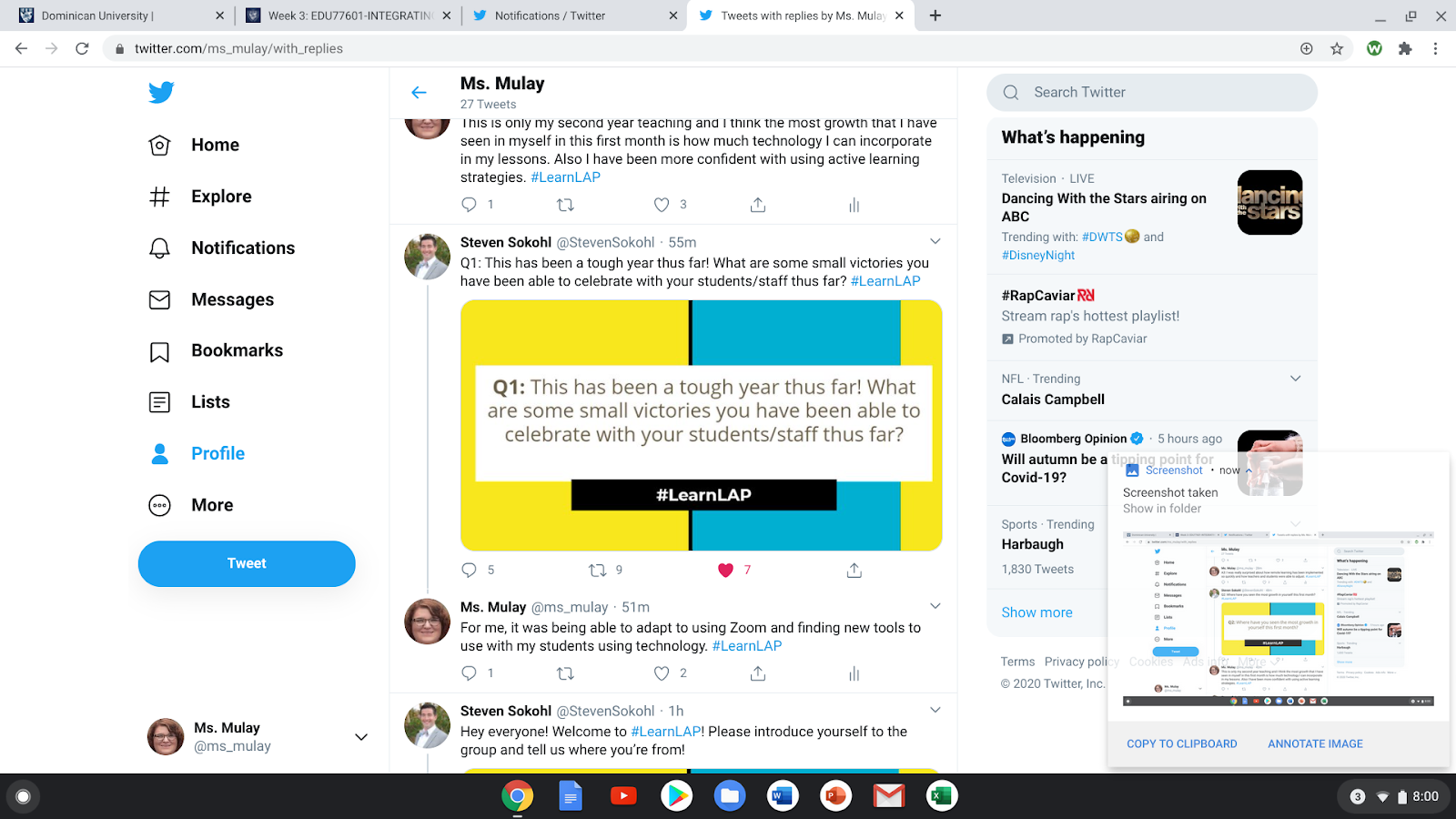
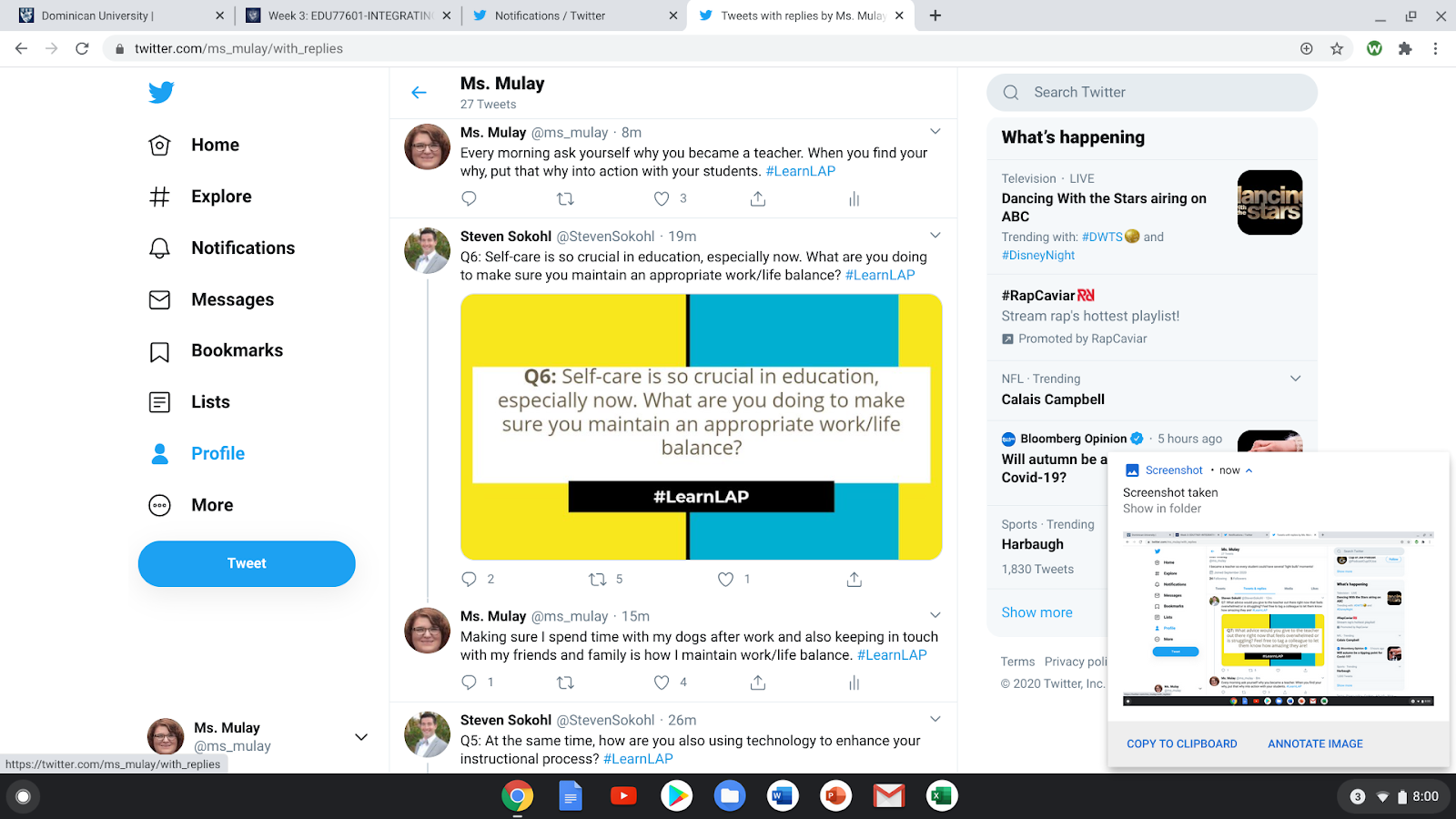
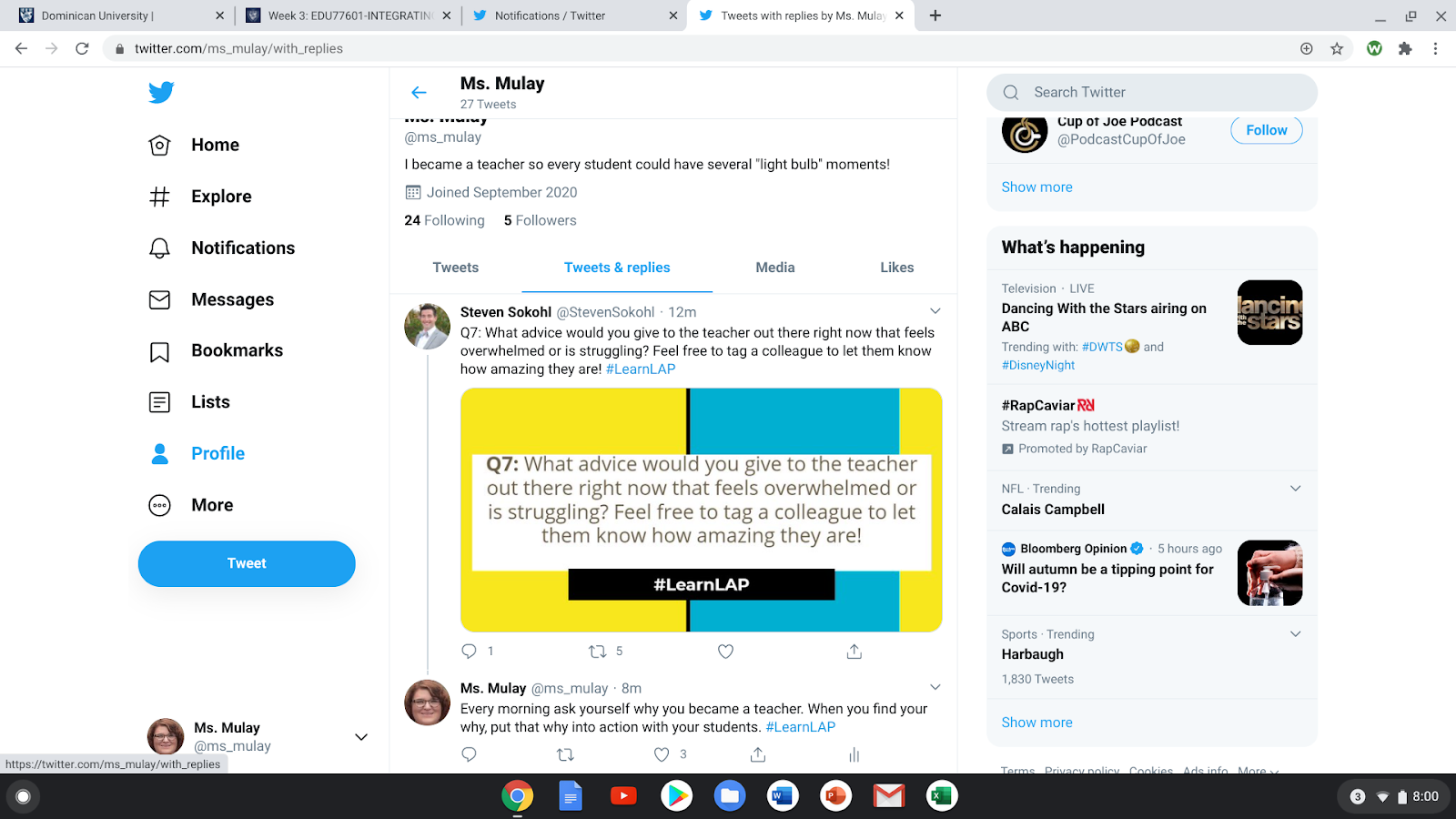
As an educator, it is important to make a professional mark, even on the internet. Twitter has many opportunities to have chats to communicate with other educators. During the four weeks that I have been on Twitter, I have participated in two Twitter Chats. The first chat that I participated in was very engaging and I had a great time answering the questions that Steven Sokohl was posting. I was writing in the comments and noticed that I was receiving a lot of feedback from other educators, which made me feel as if I was a celebrity because I never had any interactions on Twitter before. I also realized that I struggled to put in the hashtag (#) in for my responses. A goal for me is to remember to put the hashtags in my responses before I post them. I really enjoyed this chat because it helped me realize what I do as a teacher and how my job is making a difference, even in a pandemic. I also learned that it is fine to have some personal time and take a mental break because the end of last school year and the beginning of this one has really been difficult on teachers and students.


Below are my responses during this Twitter Chat.


Image Source: Deanna Mulay, Personal Images (@ms_mulay)


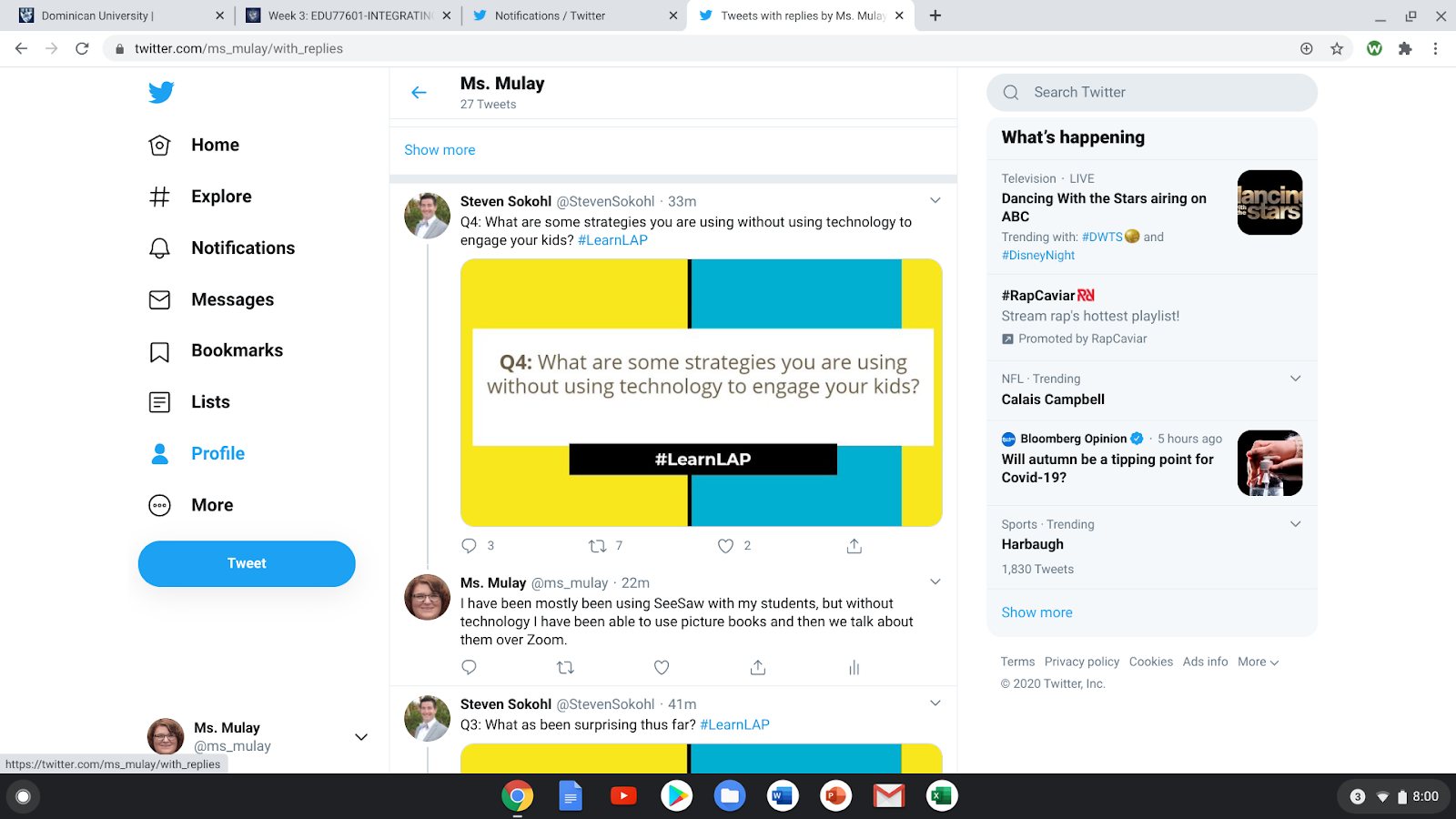
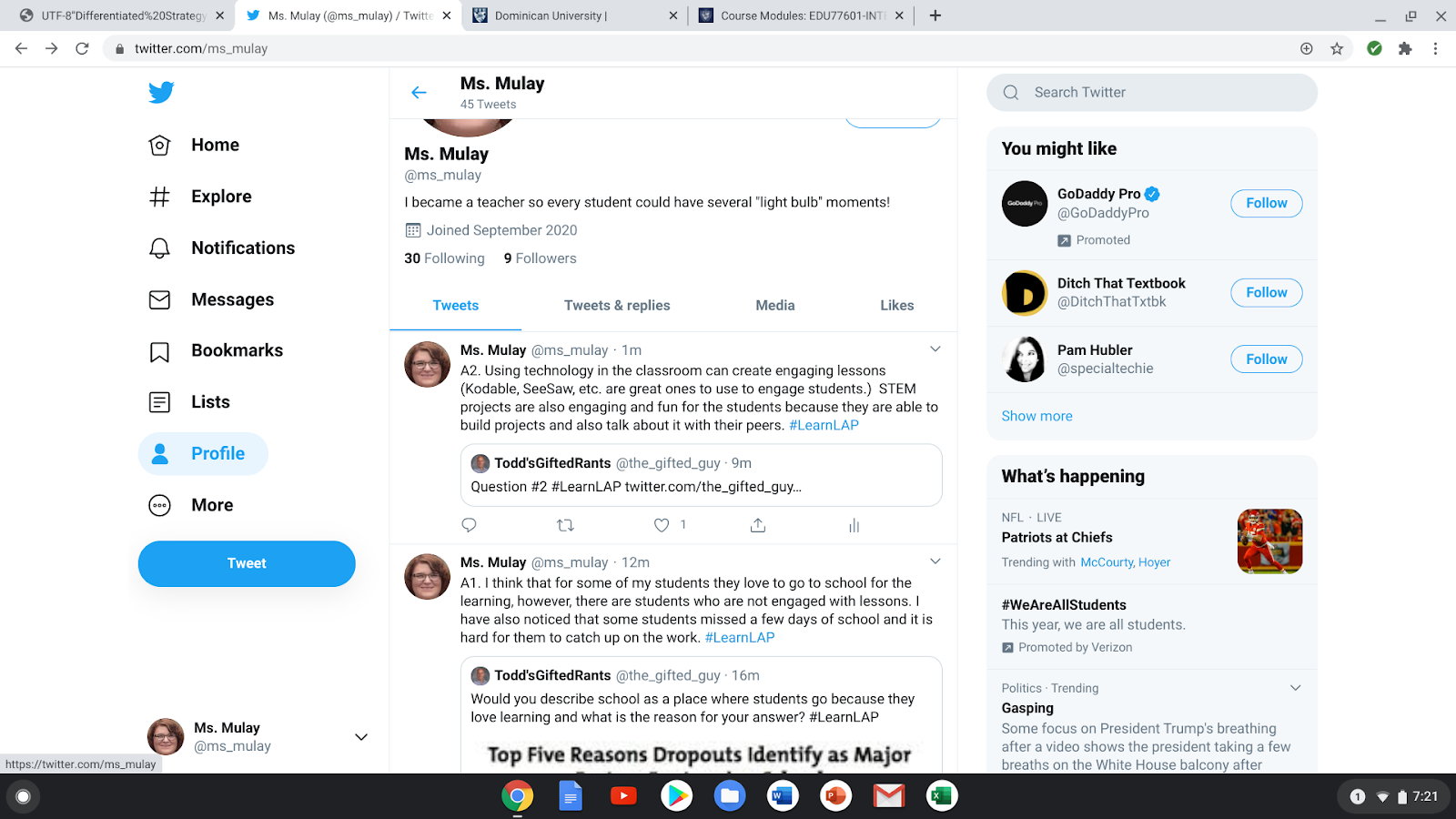
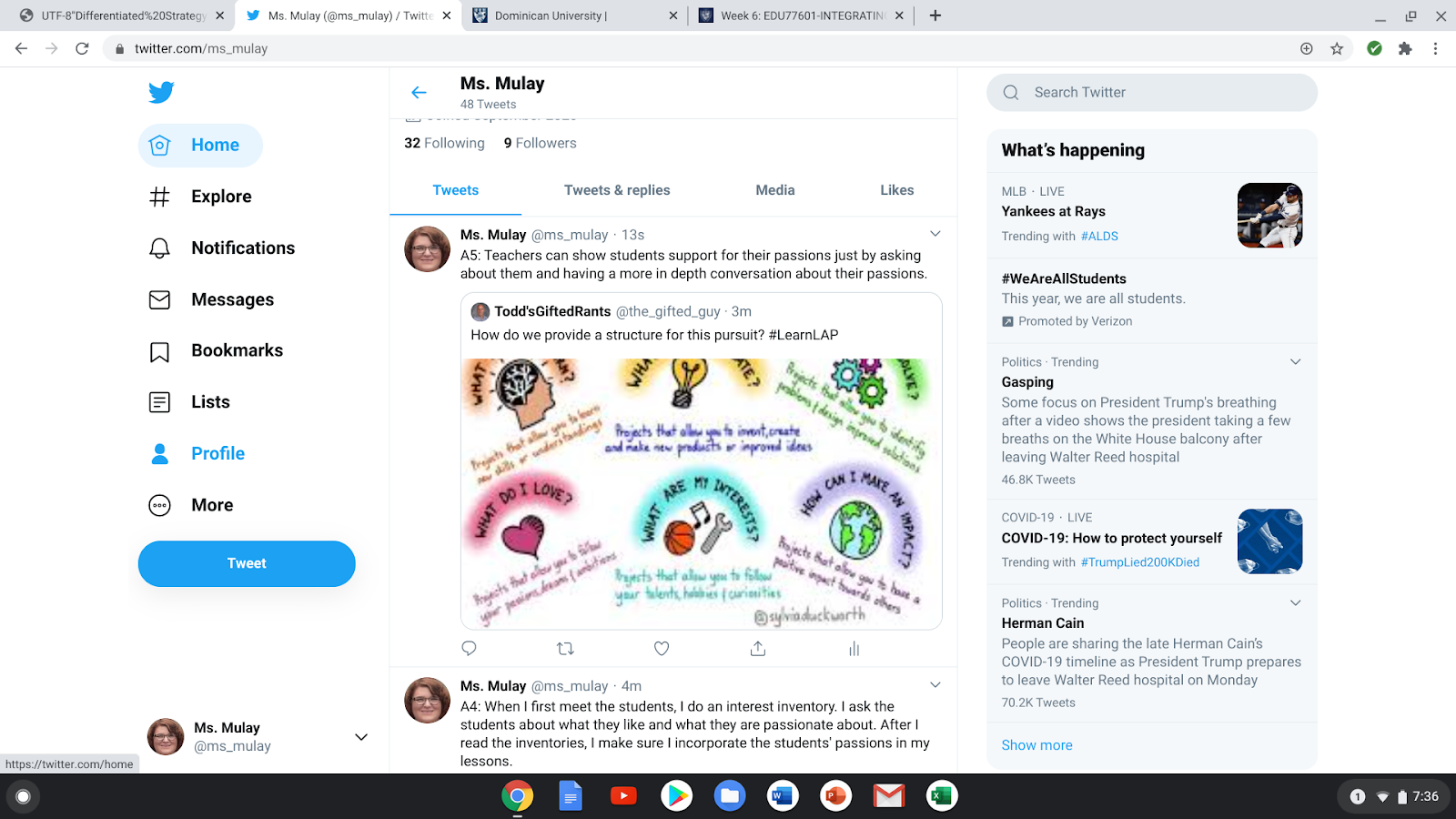
After the chat had ended, I was so excited to hear that there was another chat happening the next Monday. So I decided to join that chat, but participate in another way. I “quote retweeted” the question and wrote my answer to the question. I saw a few other people quote retweets the week before, so I thought I would give it a go. Again, I had a great time answering the questions that the host, Todd'sGiftedRants, was asking, but I found that more people were retweeting my responses and making comments to go along with or disagree with what I stated. I had a hard time accepting the comments because I am the type of person that likes to be hidden and not take risks. However, participating in the chat helped me realize that, as a professional, I need to be seen/heard and take risks by collaborating with other educators. Now I understand the purpose of a PLN and how it can help me grow as an educator. 


Again, below are my responses to my second chat. 


Image Source: Deanna Mulay, Personal Images (@ms_mulay)


Resources That Can Grow My PLN:


As I was looking up different people and organizations to follow, I came across amazing resources for teachers. I would have to say my favorite resource that I found was The Nuts and Bolts of Feedback. As educators, we rely on feedback such as observations from our administers, but we also look for feedback as teachers by giving our students assessments. To be a life-long learner, it is important to receive and give strong, supportive feedback. By asking students and even coworkers where they can see themselves in each of the cups on the worksheet (image below), it will help educators and administrators to support others to strengthen their feedback. This resource also provides students an opportunity to self-assess how they see themselves and what they may want to improve on. Self-reflecting is also a great skill for a life-long learner to have. There are so many resources on Twitter that I was missing out on when I did not create my professional account.


Image Source: https://twitter.com/FloopEdu/status/1306262600951279617 


Reflection on Twitter: 


Signing up for my Twitter account, I was reluctant because I thought it was going to be hard to chat with other educators and the tweets would be about random facts or thoughts that people decided to share. However, I found out that Twitter is a great way to find resources, connect with other educators, and build a digital footprint professionally. When I get home, I look forward to scroll through my Twitter feed and see if there are any chats going to happen or if any new books or resources are available. If I did not sign up for Twitter, I would truly be missing out on building and also expanding my PLN. So, if you are an educator who has not signed up for a Twitter account, think about signing yourself up. You never know what resources you will find!   


Troubleshooting Guide for Educators

Technology is not always perfect or easy to work with. However, by having a step-by-step guide, it will help you better understand your comp...